


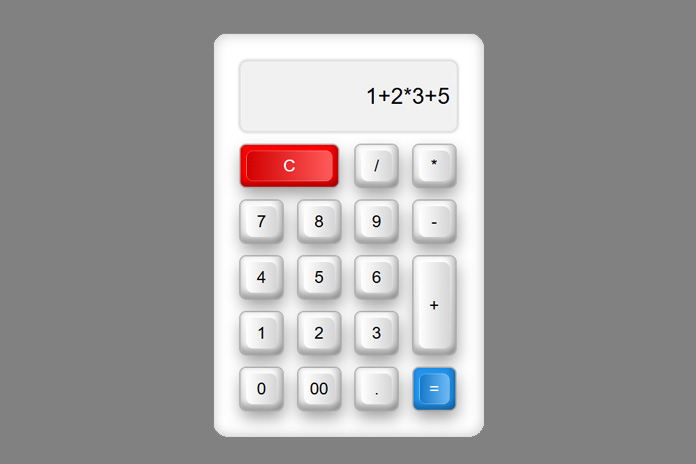
Looking to add a stylish and functional calculator to your site or portfolio? This JavaScript calculator is built using basic HTML, CSS, and JavaScript—perfect for learning or quick implementation.
📐 HTML Structure
We start with a responsive container housing the calculator UI. Each button is a element with onclick events to handle input or evaluate expressions.
HTML Code
<div class="container">
  <div class="calculator">
    <input type="text" class="value" readonly name="txt" id="output">
    <span class="num clear" onclick="btnInput()"><i>C</i></span>
    <span class="num" onclick="btnInput('/')"><i>/</i></span>
    <span class="num" onclick="btnInput('*')"><i>*</i></span>
    <span class="num" onclick="btnInput('7')"><i>7</i></span>
    <span class="num" onclick="btnInput('8')"><i>8</i></span>
    <span class="num" onclick="btnInput('9')"><i>9</i></span>
    <span class="num" onclick="btnInput('-')"><i>-</i></span>
    <span class="num" onclick="btnInput('4')"><i>4</i></span>
    <span class="num" onclick="btnInput('5')"><i>5</i></span>
    <span class="num" onclick="btnInput('6')"><i>6</i></span>
    <span class="num plus" onclick="btnInput('+')"><i>+</i></span>
    <span class="num" onclick="btnInput('1')"><i>1</i></span>
    <span class="num" onclick="btnInput('2')"><i>2</i></span>
    <span class="num" onclick="btnInput('3')"><i>3</i></span>
    <span class="num" onclick="btnInput('0')"><i>0</i></span>
    <span class="num" onclick="btnInput('00')"><i>00</i></span>
    <span class="num" onclick="btnInput('.')"><i>.</i></span>
    <span class="num equal" onclick="calculate()"><i>=</i></span>
  </div>
</div>
🎨 CSS Styling
We use a soft neumorphic design with gradients and shadows to give the calculator a modern aesthetic. The layout is powered by CSS Grid for clean alignment and spacing.
CSS Code
@import url("https://fonts.googleapis.com/css2?family=Roboto&display=swap");
body {
  font-family: 'Roboto', sans-serif;
}
.container {
  width: 390px;
  padding: 40px 30px 30px;
  border-radius: 20px;
  box-shadow: 0px -1px 0px rgba(0,0,0,0.25), inset -5px -5px 15px rgba(0,0,0,0.15), inset 5px 5px 15px rgba(0,0,0,0.12);
  background: #ffffff;
}
.calculator {
  display: grid;
}
.calculator .value {
  grid-column: span 4;
  height: 100px;
  margin-bottom: 10px;
  background: #f1f1f1;
  border-radius: 10px;
  box-shadow: 0 0 3px 3px rgba(0,0,0,0.14);
  text-align: right;
  padding: 10px;
  font-size: 2em;
}
.calculator span {
  display: grid;
  place-items: center;
  width: 60px;
  height: 60px;
  margin: 10px;
  background: linear-gradient(180deg, #ffffff, #e7e7e7);
  box-shadow: inset -8px 0 8px rgba(0,0,0,0.15), inset 0 -8px 8px rgba(0,0,0,0.25), 0 0 0 2px rgba(159,159,159,0.73), 2px 11px 23px rgba(0,0,0,0.40);
  border-radius: 8px;
  cursor: pointer;
}
.calculator span::before {
  content: '';
  position: absolute;
  background: linear-gradient(90deg,#ffffff,#d5d5d5);
  top: 8px;
  left: 8px;
  bottom: 8px;
  right: 8px;
  border-radius: 10px;
}
.calculator span i {
  font-size: 1.5em;
  text-transform: uppercase;
}
.calculator .clear {
  grid-column: span 2;
  width: 140px;
  background: #f00;
  color: #fff;
}
.calculator .equal {
  background: #2196f3;
  color: #fff;
}
.calculator .plus {
  grid-row: span 2;
  height: 140px;
}
.calculator span:active:before {
  top: 10px;
  left: 10px;
  bottom: 6px;
  right: 6px;
}
⚙️ JavaScript Functionality
Two simple functions make this calculator work:
- One handles input
- One evaluates the expression
JavaScript Code
⚠️ Note: eval() is fine for demos but can be risky in production. Use with caution or consider safer alternatives like a math parser library.
👨💻 Final Thoughts
This calculator is perfect for learning DOM manipulation, layout techniques, and creating interactive components. You can view it live right here and explore how it’s built.








0 comments