


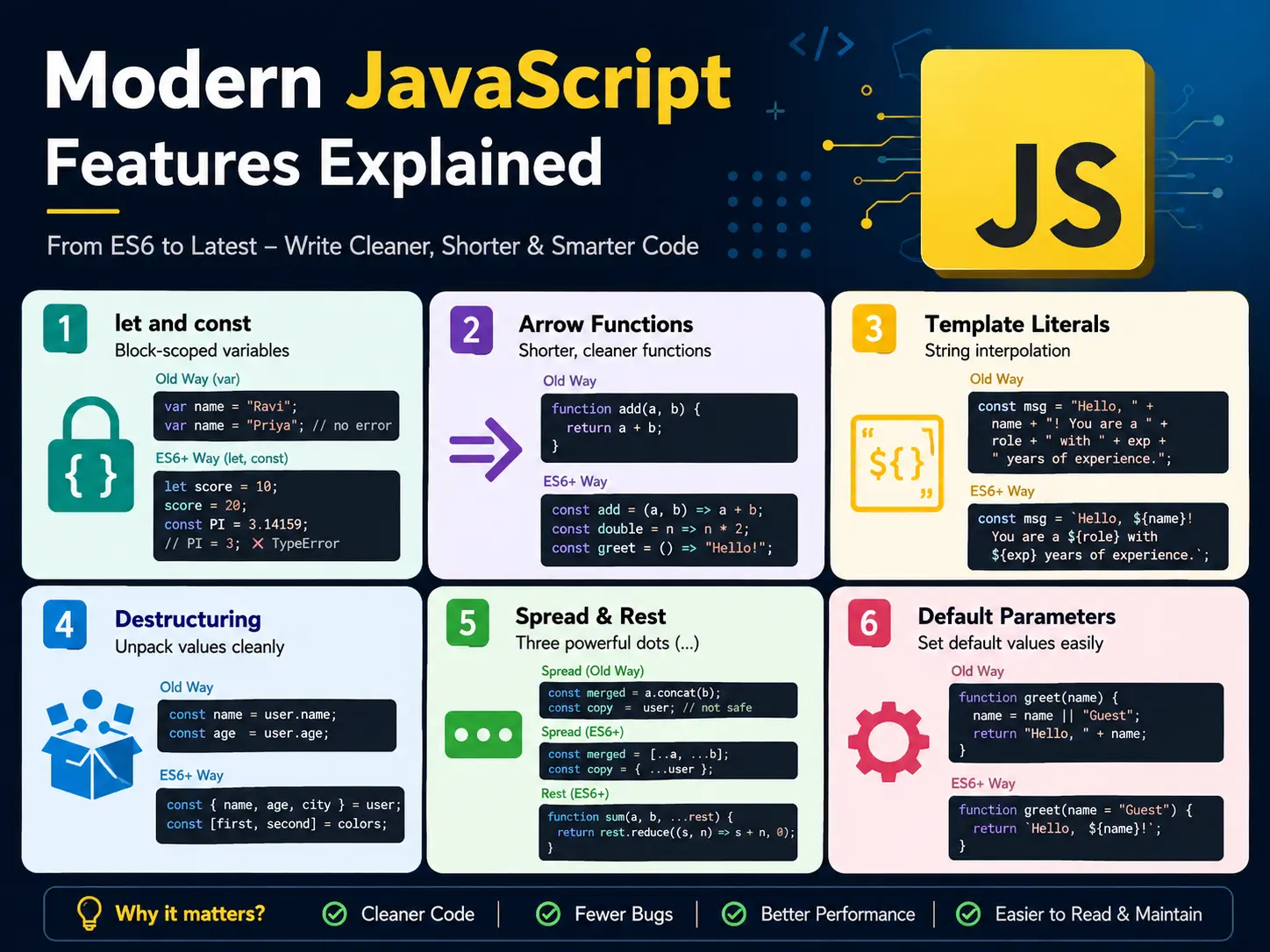
JavaScript has come a long way since the early days of var, callback hell, and verbose object cloning. Starting with ES6 (ES2015) and continuing through every year since, JavaScript has gained powerful features that make code shorter, cleaner, and far easier to read.
If you’re still writing JavaScript the old way — or you’ve seen modern JS syntax and wondered what it all means — this guide covers everything you need to know. Every feature includes a real before/after example so you can see exactly what changed and why it matters.
1. let and const — Block-scoped variables
Before ES6, var was the only way to declare variables. It had confusing scoping rules and allowed re-declaration, leading to hard-to-find bugs. let and const fix this.
// Old way
var name = "Ravi";
var name = "Priya"; // no error — silent bug

// ES6 way
let score = 10;
score = 20;         // allowed — let can be reassigned

const PI = 3.14159;
PI = 3;             // ❌ TypeError — const cannot be reassigned
Rule of thumb: Use const by default. Switch to let only when you know the value will change. Never use var.
2. Arrow Functions — Shorter, cleaner functions
Arrow functions are a concise syntax for writing functions — and they handle this differently from regular functions, which matters a lot in React and class-based code.
// Old way
function add(a, b) {
  return a + b;
}

const double = function(n) {
  return n * 2;
};

// ES6 arrow functions
const add = (a, b) => a + b;
const double = n => n * 2;
const greet = () => "Hello!";

// Multi-line arrow function
const getUserInfo = (user) => {
  const fullName = `${user.first} ${user.last}`;
  return fullName.toUpperCase();
};
If the function body is a single expression, you can skip the curly braces and return keyword — the value is returned implicitly.
3. Template Literals — String interpolation
No more awkward string concatenation with +. Template literals use backticks and ${} to embed variables and expressions directly inside strings.
const name = "Devender";
const role = "Senior Developer";
const exp = 8;

// Old way
const msg = "Hello, " + name + "! You are a " + role + " with " + exp + " years of experience.";

// ES6 template literal
const msg = `Hello, ${name}! You are a ${role} with ${exp} years of experience.`;

// Multi-line strings
const html = `
  <div class="card">
    <h2>${name}</h2>
    <p>${role}</p>
  </div>
`;

// Expressions inside ${}
const price = 499;
const tax = 0.18;
console.log(`Total: ₹${(price * (1 + tax)).toFixed(2)}`);
4. Destructuring — Unpack values cleanly
Destructuring lets you extract values from arrays and objects into individual variables in a single line.
Object destructuring
const user = { name: "Priya", age: 28, city: "Delhi" };

// Old way
const name = user.name;
const age = user.age;

// ES6 destructuring
const { name, age, city } = user;

// Rename while destructuring
const { name: userName, age: userAge } = user;

// Default values
const { name, country = "India" } = user;

// Nested destructuring
const { address: { street, pincode } } = {
  address: { street: "MG Road", pincode: "110001" }
};
Array destructuring
const colors = ["red", "green", "blue"];

// Old way
const first = colors[0];
const second = colors[1];

// ES6 destructuring
const [first, second, third] = colors;

// Skip elements
const [, , third] = colors; // "blue"

// Swap variables
let a = 1, b = 2;
[a, b] = [b, a]; // a = 2, b = 1

// With function returns
const [min, max] = getRange(); // clean and readable
5. Spread and Rest Operators — Three powerful dots
Both use ... but serve opposite purposes: spread expands an array/object, rest collects multiple values into one.
Spread operator
// Copy an array
const original = [1, 2, 3];
const copy = [...original]; // [1, 2, 3] — new array

// Merge arrays
const a = [1, 2];
const b = [3, 4];
const merged = [...a, ...b]; // [1, 2, 3, 4]

// Copy an object
const user = { name: "Ravi", age: 25 };
const updated = { ...user, age: 26, city: "Mumbai" };
// { name: "Ravi", age: 26, city: "Mumbai" }

// Pass array as function arguments
const nums = [5, 10, 15];
Math.max(...nums); // 15
Rest operator
// Collect remaining function arguments
function sum(first, second, ...rest) {
  console.log(first);  // 1
  console.log(second); // 2
  console.log(rest);   // [3, 4, 5]
}
sum(1, 2, 3, 4, 5);

// Rest in destructuring
const [head, ...tail] = [10, 20, 30, 40];
// head = 10, tail = [20, 30, 40]
6. Default Parameters
Set default values for function parameters — no more if (!param) param = default inside every function.
// Old way
function greet(name) {
  name = name || "Guest";
  return "Hello, " + name;
}

// ES6 default parameters
const greet = (name = "Guest") => `Hello, ${name}!`;

greet("Arjun"); // "Hello, Arjun!"
greet();        // "Hello, Guest!"

// Multiple defaults
const createPost = (title = "Untitled", status = "draft", views = 0) => ({
  title, status, views
});
7. Shorthand Object Properties and Methods
const name = "Sneha";
const age = 24;

// Old way
const user = {
  name: name,
  age: age,
  greet: function() {
    return "Hi!";
  }
};

// ES6 shorthand
const user = {
  name,       // same as name: name
  age,        // same as age: age
  greet() {   // method shorthand
    return "Hi!";
  }
};
8. Promises — Cleaner async code
Promises replaced deeply nested callbacks (“callback hell”) with a cleaner, chainable syntax for handling asynchronous operations.
// Callback hell (old way)
getData(function(data) {
  processData(data, function(result) {
    saveResult(result, function(saved) {
      console.log("Done!", saved);
    });
  });
});

// Promise chain (ES6)
getData()
  .then(data => processData(data))
  .then(result => saveResult(result))
  .then(saved => console.log("Done!", saved))
  .catch(error => console.error("Error:", error));
9. Async/Await — Promises that read like sync code
async/await (ES2017) builds on Promises to make asynchronous code look and read like synchronous code — much easier to write and debug.
// With Promises
function fetchUser(id) {
  return fetch(`/api/users/${id}`)
    .then(res => res.json())
    .then(data => data)
    .catch(err => console.error(err));
}

// With async/await
async function fetchUser(id) {
  try {
    const res = await fetch(`/api/users/${id}`);
    const data = await res.json();
    return data;
  } catch (error) {
    console.error("Failed to fetch user:", error);
  }
}

// Parallel requests with Promise.all
async function fetchDashboard(userId) {
  const [user, posts, stats] = await Promise.all([
    fetch(`/api/users/${userId}`).then(r => r.json()),
    fetch(`/api/posts?author=${userId}`).then(r => r.json()),
    fetch(`/api/stats/${userId}`).then(r => r.json()),
  ]);

  return { user, posts, stats };
}
Always wrap await calls in try/catch — unhandled promise rejections will crash your app in Node.js.
10. Optional Chaining (?.) — Safe property access
Optional chaining (ES2020) lets you safely access deeply nested properties without crashing when something in the chain is null or undefined.
const user = {
  name: "Kiran",
  address: {
    city: "Bangalore"
  }
};

// Old way — verbose and fragile
const zip = user && user.address && user.address.zipcode;

// ES2020 optional chaining
const zip = user?.address?.zipcode; // undefined (no crash)
const city = user?.address?.city;   // "Bangalore"

// With methods
const length = user?.getName?.();   // undefined if getName doesn't exist

// With arrays
const firstTag = post?.tags?.[0];   // safe array access
11. Nullish Coalescing (??) — Better default values
The ?? operator returns the right-hand value only when the left side is null or undefined — unlike || which also triggers on 0, "", and false.
// Problem with ||
const count = 0;
const display = count || "No items"; // "No items" — wrong! 0 is valid

// Fix with ??
const display = count ?? "No items"; // 0 — correct!

// Combined with optional chaining
const userName = user?.profile?.displayName ?? "Anonymous";
const itemCount = cart?.items?.length ?? 0;
12. Modules — import and export
ES6 modules replace the old require()/module.exports pattern with a cleaner import/export syntax.
// utils.js — named exports
export const formatDate = (date) => new Date(date).toLocaleDateString();
export const capitalize = (str) => str.charAt(0).toUpperCase() + str.slice(1);
export const clamp = (val, min, max) => Math.min(Math.max(val, min), max);

// user.js — default export
const getUserFullName = (user) => `${user.first} ${user.last}`;
export default getUserFullName;

// main.js — imports
import getUserFullName from './user.js';              // default import
import { formatDate, capitalize } from './utils.js';  // named imports
import { clamp as limitValue } from './utils.js';     // rename on import
import * as utils from './utils.js';                  // import everything
13. Map and Set — New data structures
// Map — like an object but any type can be a key
const map = new Map();
map.set('name', 'Aryan');
map.set(1, 'one');
map.set(true, 'yes');

map.get('name');   // 'Aryan'
map.has(1);        // true
map.size;          // 3

// Set — array with no duplicate values
const set = new Set([1, 2, 3, 2, 1]);
console.log([...set]); // [1, 2, 3]

// Remove duplicates from an array
const nums = [1, 2, 2, 3, 3, 4];
const unique = [...new Set(nums)]; // [1, 2, 3, 4]
Quick Reference — ES6+ Cheat Sheet
| Feature | Syntax | Introduced |
|---|---|---|
| Block variables | let, const | ES6 (2015) |
| Arrow functions | () => {} | ES6 (2015) |
| Template literals | `Hello ${name}` | ES6 (2015) |
| Destructuring | const { a, b } = obj | ES6 (2015) |
| Spread / Rest | ...array | ES6 (2015) |
| Default params | fn(a = 0) | ES6 (2015) |
| Promises | .then().catch() | ES6 (2015) |
| Async/Await | async fn() { await } | ES2017 |
| Optional chaining | obj?.prop | ES2020 |
| Nullish coalescing | val ?? default | ES2020 |
| Modules | import / export | ES6 (2015) |
| Map & Set | new Map(), new Set() | ES6 (2015) |
Final Thoughts
Modern JavaScript isn’t a different language — it’s the same JavaScript, just dramatically easier to write and read. These features didn’t replace old JavaScript, they extended it. Which means you can adopt them one at a time, at your own pace.
Start with the ones you’ll use immediately: const/let, arrow functions, template literals, and destructuring. Those four alone will clean up 80% of your code. Then add optional chaining and async/await — and you’ll be writing JavaScript that looks like what you see in every modern codebase.
If you’re using these features inside React components, check out the complete React Hooks guide — you’ll see almost every ES6+ feature covered here used in real Hook examples.
And if you want to go deeper with arrays specifically, the JavaScript array methods guide pairs perfectly with what you’ve just learned.
Happy coding! 🚀







0 comments